
Reordering checks takes about five minutes if you have your last box or a check from it handy. Most printers find your previous order from your routing number, account number and ZIP code, then let you keep the same design or change it. Below are the exact steps and links for the major online printers, checked October 17, 2026.
Reorder checks at Checks Unlimited →
Affiliate link: GetBankChecks.com may earn a commission at no extra cost to you.
On this page
What you need before you reorder checks
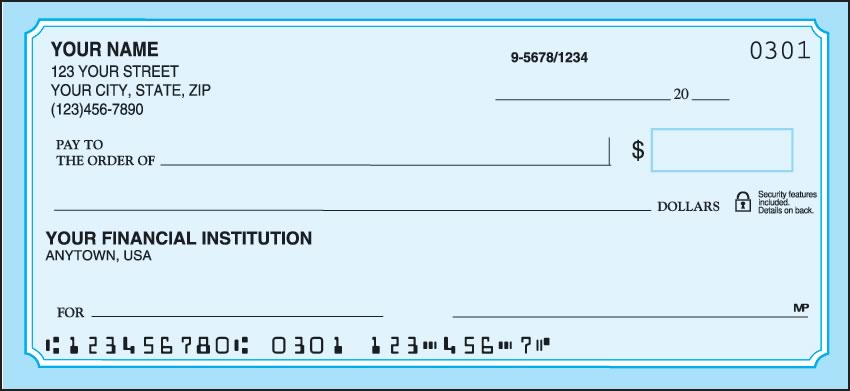
- Routing number: the 9-digit number at the bottom left of your check.
- Account number: the number printed after the routing number. Leave the check number off the end.
- Your shipping ZIP code from the last order. Checks Unlimited also asks for your last name and email.
- The next check number. Look at the last check in your current box and start the new order one higher, so the numbers continue without overlap.
- Any changes: a new address, a name change or a new bank. If your bank or account changed, start a new order instead of a reorder.
Step-by-step: how to reorder checks online
- Open your printer’s reorder page (links below). Use the same company that printed your last checks, because it has your design and settings on file.
- Enter your details. Checks Unlimited asks for last name, ZIP code, email, routing number and account number. Carousel and Bank Checks Plus ask for routing number, account number and ZIP code, or you can sign in to your account.
- Review the retrieved order. The printer shows your name, address and design. For security, Checks Unlimited doesn’t display your account number or bank name on the preview. They’re printed according to your bank’s specifications.
- Update anything that changed: address, check start number, font or monogram. If a font or symbol you used before has been discontinued, Checks Unlimited asks you to pick a new one.
- Choose quantity and format. Singles or duplicates, and the number of boxes. More boxes usually cost less per check.
- Enter an offer code if you have one (see tips below), choose shipping and pay.
Reorder pages by printer
| Printer | What it asks for | Reorder link |
|---|---|---|
| Checks Unlimited | Last name, ZIP, email, routing and account number | Reorder at Checks Unlimited |
| Carousel Checks | Routing number, account number and ZIP, or sign in | Reorder at Carousel |
| Bank Checks Plus | Routing number, account number and ZIP, or sign in | Reorder at Bank Checks Plus |
Ordered from Styles or Artistic Checks before? Both belong to the same family as Checks Unlimited and have their own reorder pages. Our Styles Checks and Artistic Checks guides explain how they work.
A quick note on Checks Unlimited reorder prices: the reorder page we checked showed the same Blue Classic pricing as a new order. One box of 80 singles was $23.49, two boxes $38.99 and four boxes $72.29. Custom fonts, monograms and MyLines messages were $2.50 each.
Reordering checks from your bank instead
You can also reorder through your bank’s website or app. It’s convenient but often costs more. You don’t have to use your bank’s printer, either. Any reputable check printer can print checks for your account. Our bank guides walk through the bank route and the cheaper alternative, for example how to order Chase checks, buy more checks for a Wells Fargo account, order Bank of America checks and reorder Capital One checks.
Order checks for your bank
Reordering for a specific bank account? These guides cover the bank’s own reorder steps and the cheaper option.
- Order Bank of America checks
- Order Wells Fargo checks
- Order Chase checks
- Order Citibank checks
- Order U.S. Bank checks
- Order PNC checks
- Order Capital One checks
- Order TD Bank checks
- Order Truist checks
- Order USAA checks
Bank not listed? See all banks and credit unions.
How to save money when you reorder checks
- Use a published code. Checks Unlimited’s Special Offers page listed KQTG (up to 30% off 2 boxes or 35% off 4 boxes) and 8FJD (a free 4th box with a 4-box order) on October 17, 2026. Carousel’s offers page listed 5OFF25, 3OFF799 and SAVE10. Details: Checks Unlimited codes and Carousel codes.
- Buy more boxes. At Checks Unlimited, four boxes cost about 23 cents a check against 29 cents for one box.
- Check the extras. Rush printing, fraud protection add-ons, labels and covers are optional. Keep the ones you want and remove the rest.
- Consider switching. A reorder is a good moment to compare. See our cheapest checks comparison, or switch to a new design from the Checks Unlimited personal checks range or your own photo checks.
See current Checks Unlimited offer codes →
Affiliate link: GetBankChecks.com may earn a commission at no extra cost to you.
Frequently asked questions
What do I need to reorder checks?
Your routing number, account number and shipping ZIP code from the last order. Checks Unlimited also asks for your last name and email. Have the last check number from your current box so the new checks continue the sequence.
Can I reorder checks from a different company than my bank?
Yes. Any reputable check printer can print checks for your account using your routing and account numbers. You do not have to buy them through your bank.
Can I change my design or address when I reorder?
Yes. After the printer retrieves your last order, you can change the address, check start number, design, font and monogram before you pay.
What check number should my reorder start with?
Start one number higher than the last check in your current box, so your check numbers do not overlap.
Do coupon codes work on reorders?
Usually. The Checks Unlimited reorder page has the same offer code box as a new order. Carousel coupons may not apply to Value Priced Checks.
What if my bank account changed?
Place a new order rather than a reorder, because a reorder reuses your previous routing and account numbers.
Affiliate disclosure: GetBankChecks.com is an independent guide, not a check printer. Some links are affiliate links, and we may earn a commission if you buy through them, at no extra cost to you. Prices, codes and designs change; confirm them on the merchant’s site before you pay.